Check Linux OS Version in Terminal
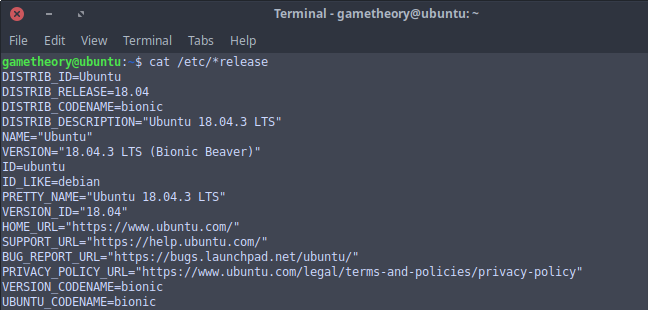
There are a few ways to check your kernel and linux os version, but today we will cover some commands to do this in a terminal.
Knowing how to check your kernel and linux os version in a terminal can be useful if you ever need help in a forum where they might ask for this information. You can also use this info in a bash script to determine what actions to take in your script based on the kernel and linux os version. Whatever the case may be, it’s a good idea to get familiar with these commands.
Tags: tutorials, linux, command lineUpdate Linux in a Terminal

Keeping linux updated is a simple hassle free task, unlike that other OS. On linux you can use a GUI app or update in a terminal. Both methods achieve the same result, but users usually have a preference. For me that’s the terminal.
Tags: tutorials, linux, command lineTime a Command in Linux

Getting familiar with timing commands in linux is a good idea. This is a good way to time long operations in a bash script or from the terminal. You can time most commands and any bash script. My favorite use case is for timing source code compilation from build scripts.
Tags: tutorials, linux, command lineRedirect and Append to a File in Linux

On every linux system you can redirect and append to the end of a file.
Linux has “stdout” which stands for “standard output”. Whenever you run a command in your terminal, the result is displayed in the stdout. You can redirect and append stdout to the end of a file.
Tags: tutorials, linux, command lineBash Exit Status
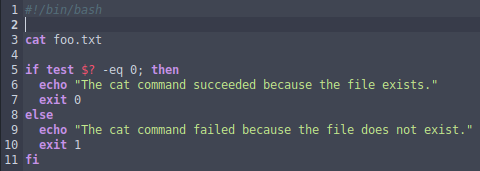
Regardless of whether a bash command ends successfully or not, it returns an exit status. Aside from letting you know that the command succeeded or failed, you can use the exit status code in bash scripts to determine what action to take with a conditional statement.
Tags: tutorials, linux, command lineRename Files & Folders Linux Command Line
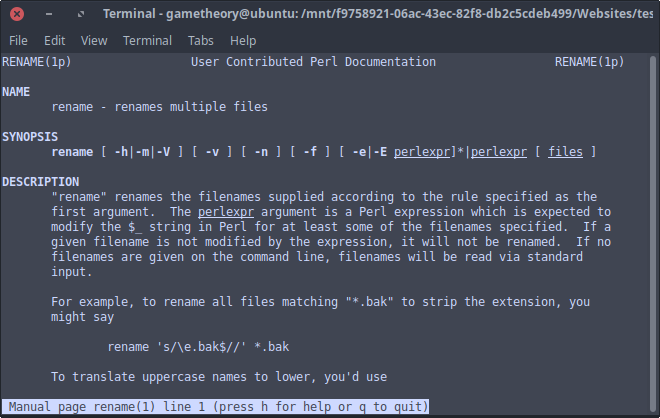
Lets take a look at how to rename files and folders in linux from the command line.
Sure you can use your GUI and be done with it, but learning to do it from the command line can be quite useful. There’s also the added benefit of being able to use these commands in bash scripts.
Tags: tutorials, linux, command lineRemove Unused Kernels Ubuntu 18.04
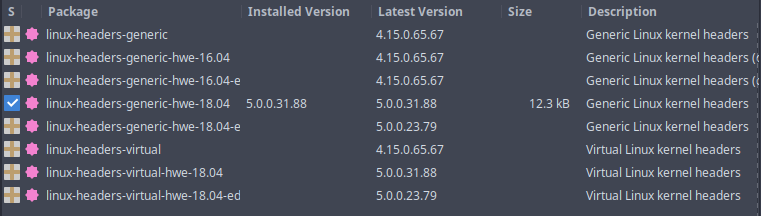
A question often asked… How do I remove old unused kernels from ubuntu 18.04?
Each time you receive a kernel update in your ubuntu 18.04 system updates, you end up with the old kernels remaining in your system. This can be useful in the event that the new kernel causes issues, you can always boot the old kernels. In time, old unused kernels can accumulate taking up unnecessary space on your drive.
Tags: tutorials, linux, command lineListen To Podcasts With The Google App

There are many podcast apps in the Google Play Store, but you already have a really good app for podcasts pre-installed on your android device that’s free. The Google app is excellent for finding and listening to podcasts and has an integrated assistant with voice commands.
Tags: android, appsBash Arrays
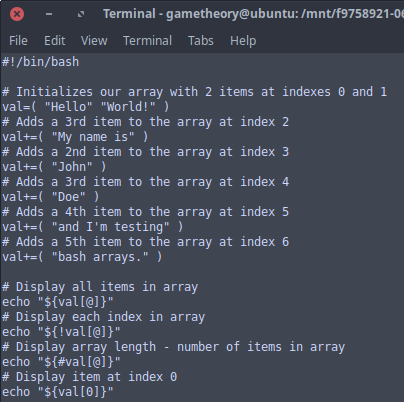
Bash arrays are quite powerful and robust, but not often used in the command line. They are variables which contain multiple values often referred to as items or elements. Arrays do not have a maximum limit for items they can contain nor do the values need to be assigned or indexed contiguously.
Tags: tutorials, linux, command lineCheck If Directory Exists In Linux With Bash
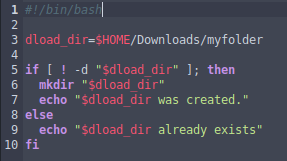
It’s useful to know how to check if a directory exists in linux from a bash script. A directory is a folder within a path in your linux system where all sorts of files and directories are stored. Your Music folder is a directory to store music files and your Downloads folder is a directory where all sorts files are downloaded from the web. You get the idea.
Tags: tutorials, linux, command line